
What does a pikelet have in common with digital accessibility? Let me tell you a story.
I still remember getting into trouble over a pikelet.
Not because I couldn’t cook. In fact, I eventually became quite good at making pikelets and made plenty of them for my own kids. However my first attempt was memorable for all the wrong reasons.
When I was a kid, Mum was given an electric frypan and she was very excited about it. I decided I was going to do something nice and cook her some pikelets. I had cooked before, so I was reasonably confident that I knew what I was doing. Looking back, “reasonably confident” might be a generous description.
There were a few problems with my plan. The first was that I had never used an electric frypan before. Did I read the instructions? No. I had a recipe, I had cooked before and I was fairly sure I knew what I was doing. Why would I need instructions? More importantly, why didn’t I check with Mum first?
The second problem was that I had learnt to cook on a wood stove. I could work out the heat by holding my hand over the stove plate to find a spot that seemed to have the right temperature. An electric frypan was a completely different experience. It had a dial with numbers, but I had no real idea what those numbers meant or how hot the pan would become.
The third problem was that I was still getting used to wearing glasses. My vision had been diagnosed as deteriorating and I was continually losing sight.
I found Aunty Ollie’s pikelet recipe, which was a very good recipe. I mixed everything together and, as far as I could tell, the mixture looked right. I then put the electric frypan on and got cooking.
The result was one enormous, completely inedible pikelet.
The frypan was far too hot. I had also managed to mix up the sugar and the salt measurements. It was not exactly the lovely morning tea I had imagined, and I certainly remember getting into trouble over it.
But there was something useful about that experience.

I didn’t learn how to use an electric frypan because someone sat me down and explained the theory of electric cooking.
I learnt because I used it.
I learnt because the pikelet was a disaster.
I learnt because I experienced what “too hot” actually meant. I learnt that the numbers on the dial mattered. I learnt that cooking on an electric frypan was different from cooking on a wood stove. I learnt that being confident wasn’t quite the same thing as knowing what I was doing.
The doing taught me the why, the what and the how.
And that is something we sometimes forget when we talk about education.
We can spend a lot of time explaining things to people, but sometimes people need the opportunity to have a go.
They need to experience it.
They need to make the connection between what they have been told and what actually happens when they put it into practice.
 Years later, my sons and nieces gave me another example.
They were making a date loaf and decided it would be nice to make it a little better by sprinkling it with icing sugar. Unfortunately, icing sugar was replaced with bicarbonate of soda.
I am sure they had their reasons at the time, but the result was not an improved date loaf.
It went straight into the bin.
They never made that mistake again.
I doubt a long explanation about the chemical differences between icing sugar and bicarbonate of soda would have had quite the same impact. They had done it. They had tasted the result. They understood.
Sometimes, the doing is the teacher.
When we talk about digital accessibility, we often focus on education as though it means telling people the rules.
Use headings.
Add alternative text.
Create meaningful links.
Structure your documents.
Make your PDFs accessible.
Check your website.
All of those things matter, but there is a danger if education stops there.
Someone can sit through an accessibility training session, take notes and still not really understand what accessibility means.
Then they go back to their desk and create their next document.
Maybe they remember the headings.
Maybe they remember the colour contrast.
Maybe they remember that they are supposed to add alternative text.
But they may not yet understand what happens when those things are missing.
Sometimes they need to do it.
This is where practical education can make such a difference. Like, cooking, accessibility isn’t just about getting the technical parts right. It is also about how communication feels for the person receiving it.
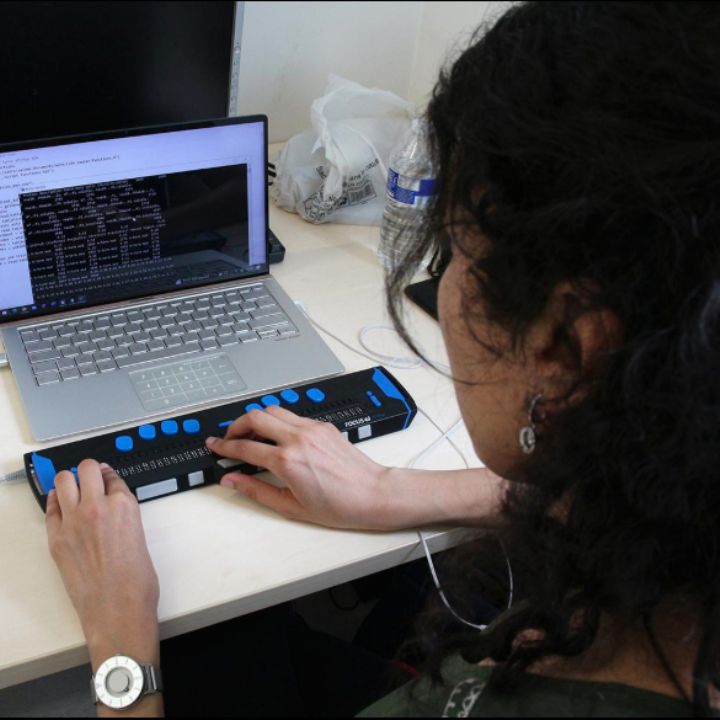
Instead of only explaining what an accessible document should contain, let people create one. Let them test it. Let them use a screen reader. Let them experience what happens when the structure is wrong.
Let them create a document. Let them test it. Let them see what a screen reader does with it. This is where testing for digital accessibility becomes part of the learning process.
Let them make something inaccessible and then try to use it.
Suddenly, the issue becomes much more than a list of accessibility requirements.
They can experience the problem for themselves.
They can understand why the heading matters because they have tried to navigate a document without one. They can understand why a meaningful link matters because they have encountered a page full of links that tell them nothing. They can understand why a PDF needs to contain real text because they have tried to read one that doesn’t.
The doing creates the understanding.

This doesn’t mean we should deliberately create barriers for people to experience.
There are plenty of people with disabilities who have already spent a lifetime experiencing inaccessible systems. They shouldn’t have to keep demonstrating the problem for others to take it seriously.
But there is value in allowing people who create digital information to experience the consequences of their decisions in a safe learning environment.
If someone creates a document that doesn’t work with a screen reader and then discovers the problem during training, that can be a powerful learning experience.
They don’t just hear that accessibility matters.
They discover it.
And discoveries tend to stick.
This doesn’t mean we should deliberately create barriers for people to experience.
There are plenty of people with disabilities who have already spent a lifetime experiencing inaccessible systems. They shouldn’t have to keep demonstrating the problem for others to take it seriously.
But there is value in allowing people who create digital information to experience the consequences of their decisions in a safe learning environment.
If someone creates a document that doesn’t work with a screen reader and then discovers the problem during training, that can be a powerful learning experience.
They don’t just hear that accessibility matters.
They discover it.
And discoveries tend to stick.
Education isn’t always a straight line
Perhaps that is the bigger lesson from my pikelet. Education isn’t always a neat process where someone tells us the why, explains the what and then teaches us the how. Sometimes we start with the doing. We have a go. Something doesn’t work. We wonder why. We find out what went wrong. We try something different. And suddenly we understand the why, the what and the how all at once. That is how I learnt to cook with different equipment. It is how my sons and nieces learnt never to substitute bicarbonate of soda for icing sugar in a date loaf. And it is how many of us learn much of what we know.
LinkedIn is where people build professional relationships, look for employment opportunities and stay informed about their industry. Accessible content ensures those opportunities can be accessed by everyone.
Keep your writing clear and easy to follow. Add descriptions to images, caption your videos and break longer posts into short paragraphs. If you share reports, brochures or PDFs, make sure those documents are also accessible.
Accessibility on LinkedIn is about creating equal access to professional information and opportunities.
This is why I believe education is one of the best ways to create change, particularly when we combine knowledge with experience.
Tell people why accessibility matters.
Show them what an accessible experience looks like.
Give them the opportunity to have a go.
Let them ask questions.
Let them make mistakes in a safe environment.
Then help them understand what happened and what they can do differently next time.
Because sometimes the explanation comes first.
Sometimes the experience comes first.
And sometimes, as my terrible first pikelet taught me, the doing is what finally makes the why, the what and the how make sense.
That is when education becomes more than information.
It becomes understanding.
And understanding is what gives us the ability to change what we do.
Contact us at reception@dasat.com.au to find out what you can do.
Imagine following a business because you are interested in its services. Every second post contains images without descriptions, videos without captions and graphics that cannot be understood with assistive technology.
After a while, you stop trying.
People are not choosing to ignore businesses. They are often being excluded by the way information is presented. Every inaccessible post sends the message that accessibility was not considered.
Every accessible post says that everyone is welcome, everyone matters and everyone deserves access to the same information.
Digital accessibility cannot be treated as an optional extra. Creating accessible social media does not require expensive software or specialist skills. It starts with thinking about the people on the other side of the screen and making sure information can be reached, understood and acted on in more than one way.
For some people with disability, social media is their connection to the world beyond their front door. It is how they keep in touch with family, learn about community events, find support, follow businesses and remain connected to the people and places that matter to them.
Every accessible post removes one more invisible barrier. When organisations choose to make social media accessible, they are improving communication, creating better user experiences, building trust and helping ensure that nobody is left behind.
For more information about breaking down invisible barriers read the book, “Invisible Barriers” by Narelle Wright. Released on the Do Better Access website it looks at the vulnerabilities that people with disability experience when the barriers are there and are invisible to many.